Pros And Cons Of Spam Filters: A Detailed Review Of Email Security
In the modern digital landscape, your email inbox is more than just a communication tool; it is a gateway to your professional identity, personal data, and financial security. However, this gateway is under constant siege. Statistical data suggests that nearly 50% of global email traffic is categorized as spam. To combat this overwhelming influx, spam filters have become the unsung heroes of cybersecurity.
While these tools are indispensable, they are not without their flaws. Understanding the pros and cons of spam filters is crucial for any user or business owner who wants to maintain a balance between high-level security and seamless communication. This detailed review explores the intricate mechanics, benefits, and drawbacks of spam filtering technology.
What is a Spam Filter and Why Does It Matter?
A spam filter is a software-based solution or a cloud service designed to identify and divert unsolicited, unwanted, and potentially dangerous emails—commonly known as “junk mail”—away from your primary inbox. These filters use a variety of algorithms and protocols to analyze incoming messages based on sender reputation, content patterns, and technical signatures.
Without an effective spam filter, your digital workspace would be cluttered with fraudulent offers, phishing attempts, and malware-laden attachments. However, as filtering technology becomes more aggressive to catch sophisticated threats, the likelihood of “collateral damage” increases.
The Advantages: Why You Need a Robust Spam Filter
The primary goal of any filtering system is protection and efficiency. Below are the core benefits that make these tools essential for modern internet users.
1. Enhanced Cybersecurity and Phishing Protection
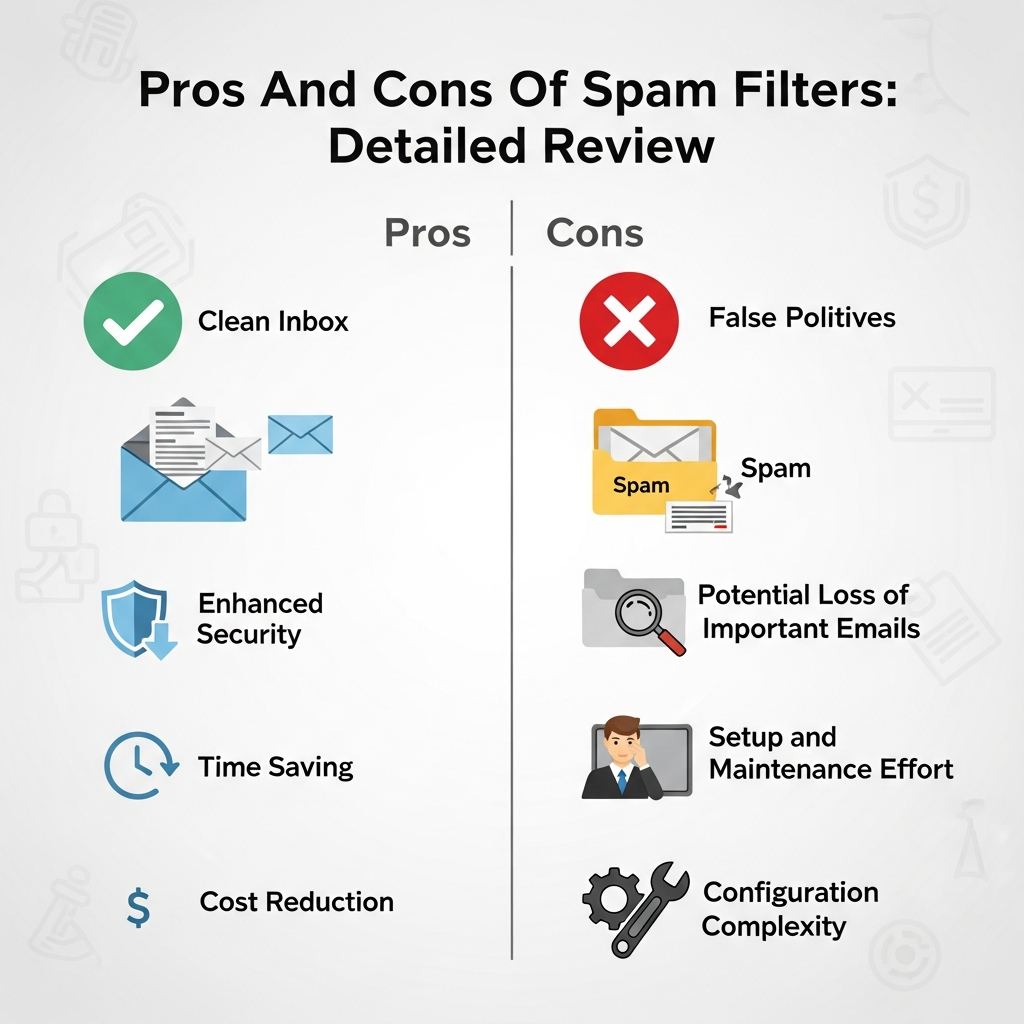
The most significant advantage of using a spam filter is the protection it offers against cyber threats. Modern spam is no longer just about annoying advertisements; it is a primary vector for phishing attacks.
Phishing emails mimic legitimate institutions to steal your login credentials or financial information. Advanced filters use Heuristic Analysis to detect suspicious links and “spoofed” headers, effectively neutralizing threats before you even see them.
2. Prevention of Malware and Ransomware
Many spam emails contain malicious attachments. If an unsuspecting user clicks on a corrupted PDF or a macro-enabled Word document, it can trigger a ransomware infection that locks an entire company’s database. Spam filters act as a first line of defense by scanning attachments for known malware signatures and suspicious code execution patterns.
3. Increased Personal and Employee Productivity
Imagine having to manually delete 50 to 100 junk emails every single morning. For a large organization, this translates to thousands of wasted hours annually. By automating the sorting process, spam filters allow you to focus on high-value tasks. You spend less time “cleaning” your inbox and more time responding to legitimate inquiries.
4. Efficient Storage Management
Spam often includes heavy images and redundant data. If thousands of these messages accumulate in your “Sent” or “Trash” folders, they consume valuable server storage. Effective filtering ensures that junk is purged regularly, keeping your mail server lean and reducing costs associated with digital storage.
5. Regulatory and Legal Compliance
For businesses in sectors like healthcare (HIPAA) or finance, protecting sensitive data is a legal requirement. A spam filter helps prevent data breaches caused by social engineering, thereby assisting your organization in remaining compliant with data protection regulations such as the GDPR.
The Disadvantages: The Hidden Costs of Filtering
Despite their sophisticated algorithms, spam filters are not perfect. There are several drawbacks that can impact your workflow if not managed correctly.
1. The Risk of False Positives
The “False Positive” is the Achilles’ heel of spam filtering. This occurs when a legitimate, important email—such as a client proposal or an urgent notification—is incorrectly flagged as spam and moved to the junk folder.
If you do not check your spam folder regularly, you might miss critical deadlines or business opportunities. This is often the result of overly aggressive filtering rules or a sender having a poorly configured email server.
2. Complexity and Maintenance
For enterprises, managing a high-end spam filter requires technical expertise. You must constantly update “Blacklists” and “Whitelists” and adjust sensitivity levels. If the filter is too lenient, spam gets through; if it is too strict, you lose important mail. Finding this “sweet spot” requires ongoing monitoring and administrative overhead.
3. Latency in Email Delivery
In some cases, especially with deep-packet inspection or cloud-based filtering, there can be a slight delay in email delivery. The filter needs time to analyze the content, check the sender’s reputation against global databases, and scan attachments. While this delay is usually measured in seconds, for time-sensitive high-frequency trading or urgent communications, every second counts.
4. The “Arms Race” with Spammers
Spammers are constantly evolving their tactics. They use techniques like image-based spam (where text is embedded in an image to bypass text scanners) or “snowshoe spamming” (spreading spam across many different IP addresses). This forces filtering software to become more complex and resource-intensive, which can sometimes lead to higher subscription costs for the end-user.
How Different Types of Spam Filters Work
To understand the pros and cons of spam filters deeply, you must understand how they operate. Most modern systems use a multi-layered approach:
- Content Filters: These scan the body of the email for specific keywords (e.g., “win,” “free,” “viagra”). While effective, they are the most likely to cause false positives if you are in an industry that uses similar terminology.
- Bayesian Filters: This is a sophisticated mathematical approach. The filter “learns” from your behavior. If you mark an email as spam, the filter analyzes the word frequency and calculates the probability that future similar emails are also junk.
- Blacklist Filters: These rely on a database of known “bad” IP addresses and domains. If an email comes from a blacklisted source, it is blocked immediately.
- Greylisting: This method temporarily rejects any email from a sender it doesn’t recognize. Since legitimate servers will attempt to resend the mail while spam bots often won’t, it effectively filters out low-level automated spam.
The Role of AI and Machine Learning
We are currently witnessing a shift from static rule-based filtering to Artificial Intelligence (AI) and Machine Learning (ML).
AI-powered filters can analyze the “intent” of an email rather than just looking for keywords. They can detect subtle anomalies in a sender’s writing style, which is particularly useful for stopping Business Email Compromise (BEC)—a type of attack where a hacker impersonates a CEO or high-level executive to request a wire transfer.
Pro: AI reduces false positives by understanding context.
Con: AI filters can be expensive and may require significant data to “train” effectively.
Impact on Email Marketing: The Sender’s Perspective
If you are a business owner sending newsletters, spam filters can be your greatest obstacle. Even if your content is legitimate, you might be blocked if:
- You use too many “spammy” trigger words.
- Your SPF (Sender Policy Framework), DKIM, or DMARC records are not set up correctly.
- Your “Unsubscribe” link is missing or hidden.
This highlights another “con”: legitimate marketing efforts can be stifled by the very tools meant to protect us.
Best Practices to Optimize Your Spam Filter Settings
To maximize the pros and minimize the cons, follow these expert tips:
- Regularly Review the Junk Folder: Set a schedule (e.g., once a day) to skim your spam folder for false positives.
- Use Whitelisting: Add your important contacts, clients, and software notification addresses to your “Safe Senders” list.
- Train Your Filter: Never just delete a spam email from your inbox. Use the “Mark as Spam” or “Report Phishing” button. This helps the machine learning algorithm improve.
- Implement Multi-Layered Security: Do not rely solely on your email provider’s default filter. Consider third-party solutions like Mimecast, Barracuda, or Proofpoint for enhanced enterprise security.
- Educate Users: The best filter in the world can’t stop a user who insists on clicking a suspicious link. Combine technical filters with cybersecurity awareness training.
Frequently Asked Questions (FAQ)
1. Can I completely turn off my spam filter?
Yes, most email providers allow you to disable filtering. However, this is highly discouraged. Without a filter, your inbox will be flooded with thousands of junk messages, and your risk of falling victim to a cyberattack increases by over 90%.
2. Why do legitimate emails go to spam?
This usually happens because the sender’s IP address has a poor reputation, or their email contains elements that trigger the filter’s “suspicion” threshold, such as excessive links, large attachments, or specific keywords.
3. Are free spam filters as good as paid ones?
Free filters (like those in Gmail or Outlook.com) are excellent for personal use as they benefit from massive datasets. However, paid filters offer more granular control, better reporting, and specialized protection against advanced persistent threats (APTs) for businesses.
4. What is a “False Negative”?
A false negative occurs when a spam or malicious email successfully bypasses the filter and lands in your primary inbox. This is the most dangerous scenario as it exposes the user to potential threats.
Conclusion: Striking the Perfect Balance
In the debate over the pros and cons of spam filters, the advantages clearly outweigh the disadvantages. While the risk of missing an important email due to a false positive is real, the alternative—exposing your data and systems to hackers—is far more damaging.
The key to successful email management is not to find a “perfect” filter, but to implement a system that you monitor and refine. By combining advanced AI-driven filtering technology with human vigilance and proper server configuration, you can enjoy a clean, secure, and highly productive digital communication environment.
As we move further into 2024 and beyond, staying informed about these tools is your best defense in an increasingly complex digital world.